Out by 4mm
A cabinetmaker I know draws every job by hand on graph paper: kitchens, laundries, wardrobes. When a customer wants to see what they’re getting, he sends them a photo of the sketch.
The idea was a proper drawing instead, something he could put in front of a client and eventually turn into a cutting list. He was clear the drawings are for his clients, not just for him. That sets the bar. A wrong number on a client’s drawing is a wrong cabinet.
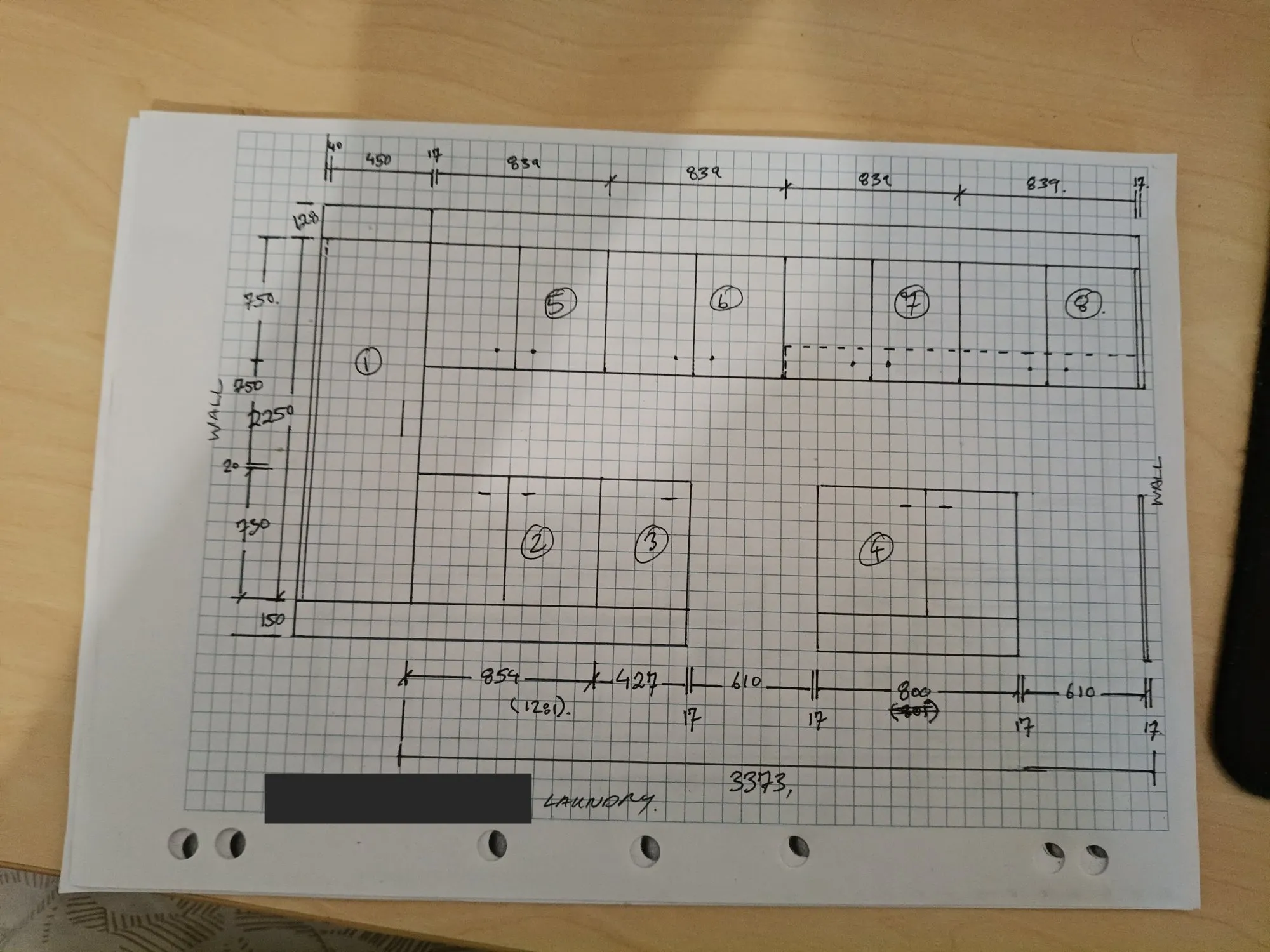
One of his real sketches, a laundry, turned the right way up. It arrived sideways. The customer’s name is blacked out.
How it works now
He photographs a sketch and emails it to one address. A few minutes later a reply lands in the same thread with two attachments: an A3 shop drawing, and an A4 run sheet. Nobody sits in the middle.
The whole loop was proven end to end today, with the mailbox sending itself three of his earlier sketches. His first real email is still to come.
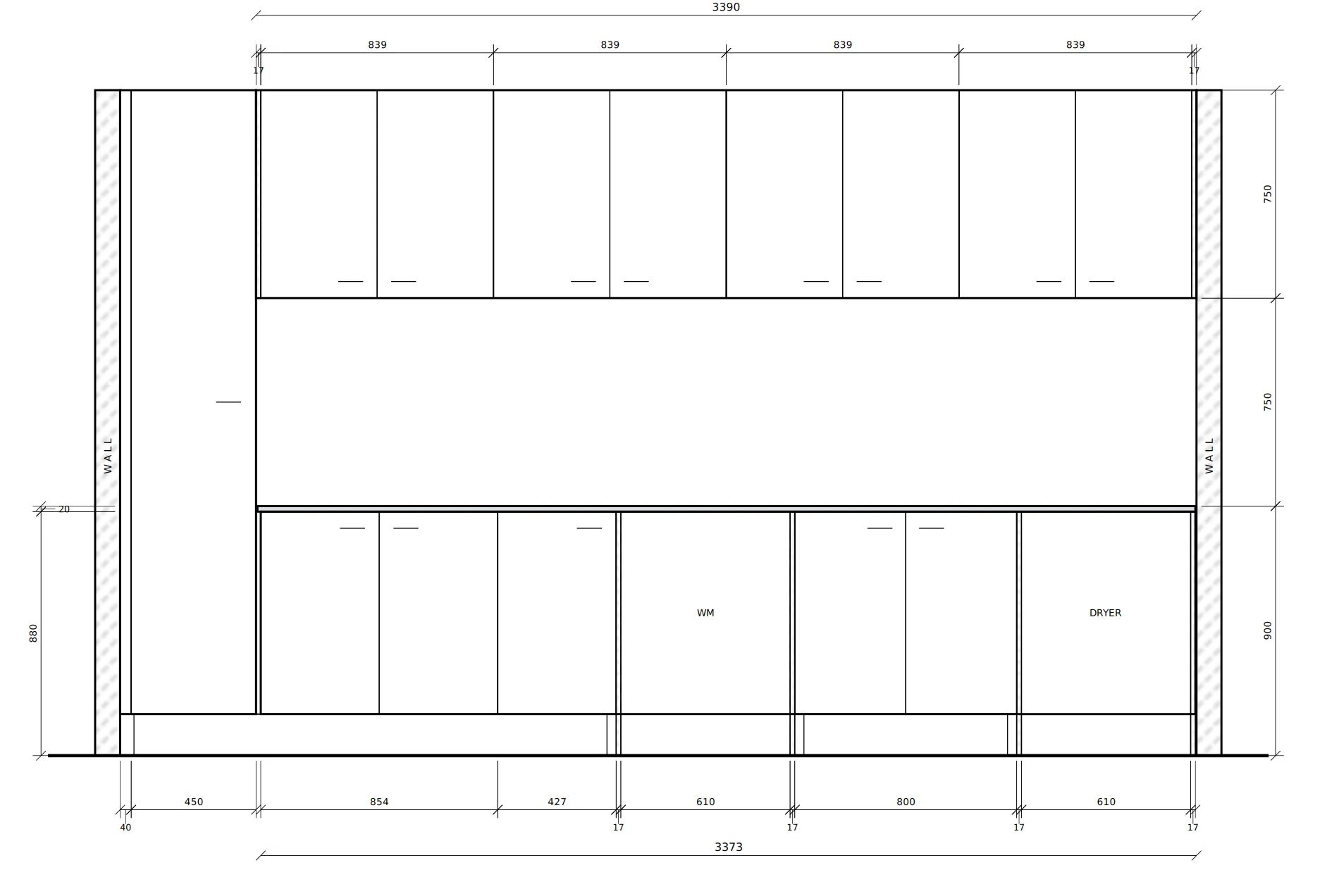
The drawing it made from that sketch, cropped to the elevation. On the full A3 sheet the title block carries a placeholder business and customer.
Two halves, kept apart
Turning a photo into a drawing is two very different jobs.
Reading the sketch is the hard, error-prone part: which lines are cabinets, which number belongs to which box, what “WM” means. Claude reads the photo into a structured description of every cabinet. Drawing from that description is ordinary code. It’s deterministic and boring, and it does the same thing every time.
Between the two sits arithmetic. The cabinet widths along a run have to add up to the overall he wrote. It’s the cheapest possible check that the reading went right, and it doesn’t need anyone to know the answer in advance.
Out by 4mm
His laundry doesn’t add up. The base cabinets, as written, come to 3369. The overall he wrote underneath is 3373.
The first version refused to draw anything that didn’t close. That sounds rigorous. In practice it meant two of his sheets that had been read perfectly were refused over a few millimetres, because real sketches are drawn by people, and people round.
So now it draws every cabinet at the width he wrote, prints his overall exactly as he wrote it, and says so on the sheet, in capitals: modules sum to 3369; the sketch writes 3373 - 4mm unaccounted, confirm. Then it asks him.
The run sheet
Everything the pipeline wasn’t sure of becomes a numbered item on one A4 page, and every item has one of three shapes:
- a claim, with Right and Wrong boxes and a line to write the fix on;
- a question, with a blank and its unit;
- a choice, with A and B spelled out.
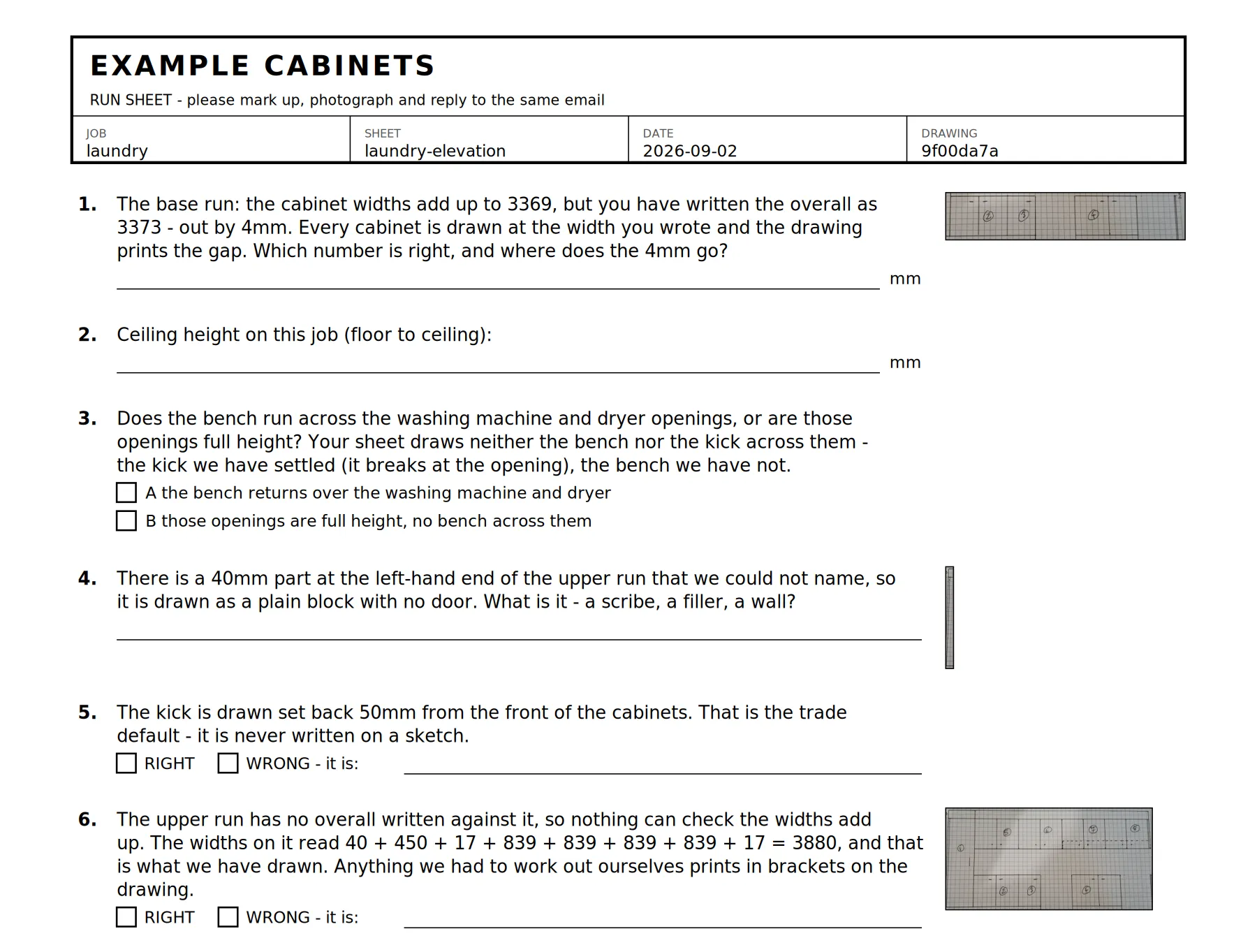
The first six items of the run sheet for that laundry. The business and job names are placeholders.
Item 1 is the 4mm. Item 3 is a genuine either/or the sketch can’t settle: does the bench run across the washing machine and dryer, or are those openings full height? Item 4 admits it found a 40mm part it couldn’t name.
Two rules came from an earlier round of questions I put to him on a page he could tick. Four of those items were really questions, and I’d given them Right and Wrong buttons. Four ticks came back, and they confirmed nothing. So the sheet now refuses to print at all if any question carries a Right/Wrong box. And there’s no “anything else?” box, because on that page both open boxes came back empty while every numbered item got an answer.
Where an item relates to a spot on the sketch, the sheet prints a crop of his own drawing beside it, so he’s checking against his own ink. He marks it up, photographs it, and replies to the same email.
The photos were upside down
Phone photos carry a tag saying which way up they are. For a whole day in August, every test I ran was on sketches the model was seeing upside down or sideways, because the photos carried a wrong orientation tag and the API honoured it.
Two problems I’d written down as the model’s limitations disappeared once the photos were the right way up. One of them was blocking the next stage of the build. It didn’t exist.
That’s also why the input is email and not a messaging app. A mail client attaches the original photo straight off the camera roll, where a messaging app compresses it and can strip the tag. Of the seven sheets he’d photographed that arrived today, six needed turning before anything could read them.
Not every sheet is a drawing
His job book isn’t all elevations. Of the twelve sheets I have from it, seven are elevations, two are concept doodles, one is a floor plan, one is a cutting list, and one is unreadable. The pipeline now works out which one it’s looking at before it tries to draw anything.
The first version got two of them wrong in a useful way. They failed at “which way up is this?” and never got as far as “what is this?”. Telling him “photo unclear, please reshoot” is no help when the real answer is “this is a cutting list, and I don’t draw those yet”. So it now refuses on the fact he can act on, not the first problem it happens to hit.
No accuracy number
I’m not going to say how accurate it is, because I can’t yet. To claim “19 sheets in 20 come through without a wrong measurement”, it would have to get through 73 sheets in a row without one. It has seen about a dozen.
So every drawing says verify all dimensions on site prior to manufacture, every doubt goes on the run sheet, and the drawing is a draft for him to check, not an instruction to a saw.
What I’d take from it
- Keep the AI part and the deterministic part apart, with a check between them that doesn’t need to know the answer.
- A gate that refuses honest input over a few millimetres isn’t rigour. Draw it, name the gap, ask.
- Ask in shapes that can be answered with a tick, and refuse to print a question that can’t be.
- Check which way up your images are before you blame the model.