An order desk that's allowed to say "I don't know"
A nut and bolt wholesaler takes orders the way most trade businesses do. An email lands. Sometimes the order is in the body; usually it’s a purchase order as a PDF. Someone on the desk reads it, finds each item in the catalogue, and types the order into MYOB.
The catalogue has about 18,000 items. A typical line looks like this:
M16 x 85mm stainless 316 bolt with nut and washer — qty 33
Which of the 18,000 is that? If you know fasteners, you know. If you don’t, you’re about to learn that “316”, “A4” and a “16” buried in the middle of a part code all mean the same grade of stainless, and that a customer who doesn’t mention a finish almost always means plain.
I spent last week building the thing that answers that question. The most useful thing it learned was to say it didn’t know.
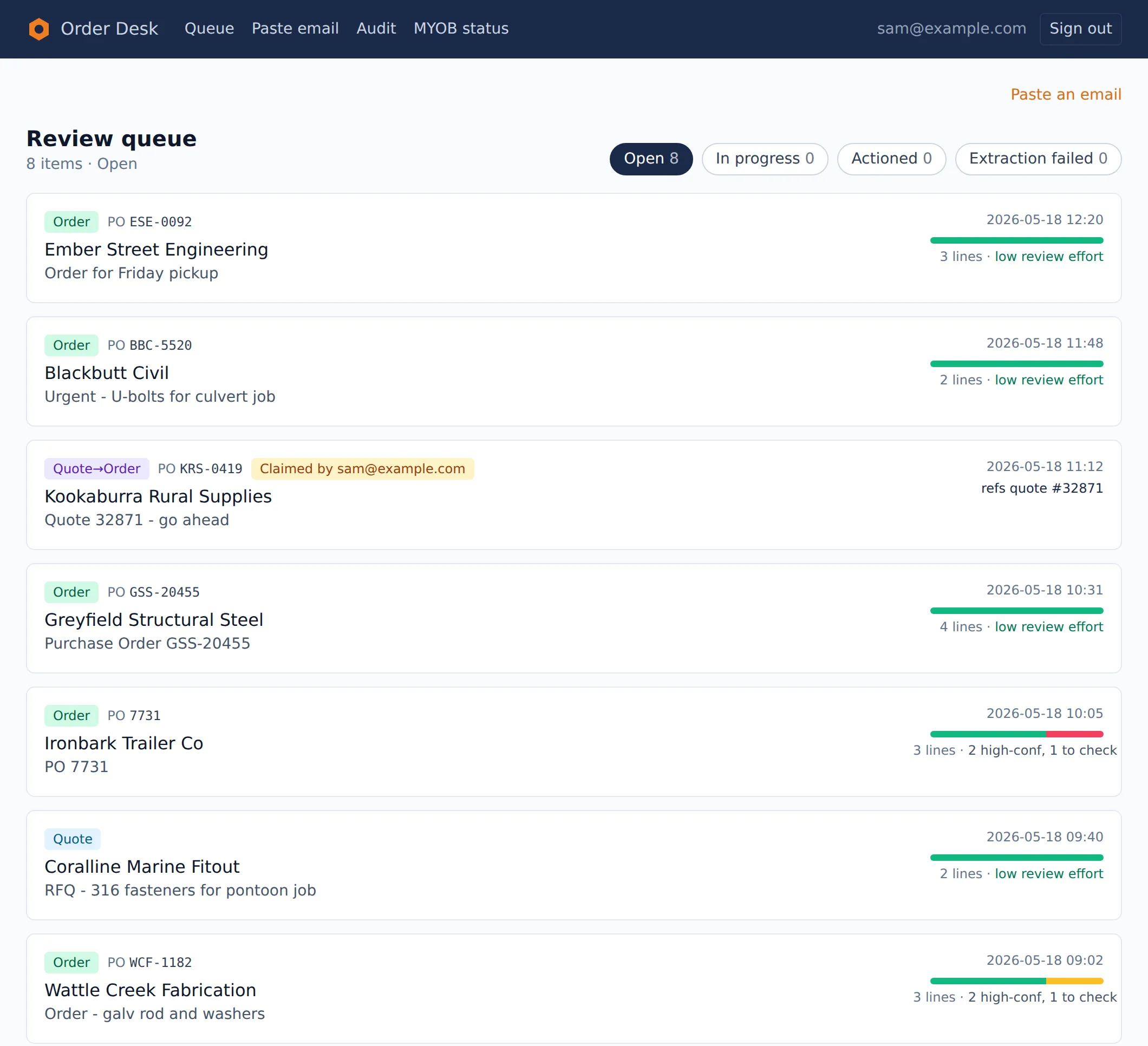
The review queue. Every customer, person, order and part code in these screenshots is invented.
The rule I started with
The AI never writes to the books on its own.
That one decision shaped everything. The first sketch had the AI reading the email and dropping a draft straight into MYOB. On paper that’s the impressive version. In practice, no matcher on a catalogue this size is going to be right every time, and nobody on a sales desk wants a machine making mistakes in their accounts.
So there’s a review step in the middle. The system reads the email, works out the customer and the lines, and puts each line on a card: its pick, how sure it is, one sentence on why, and a few alternatives underneath. Someone on the desk approves or swaps each line. Only then does a draft go to MYOB, where they still edit prices and delivery the way they always have.
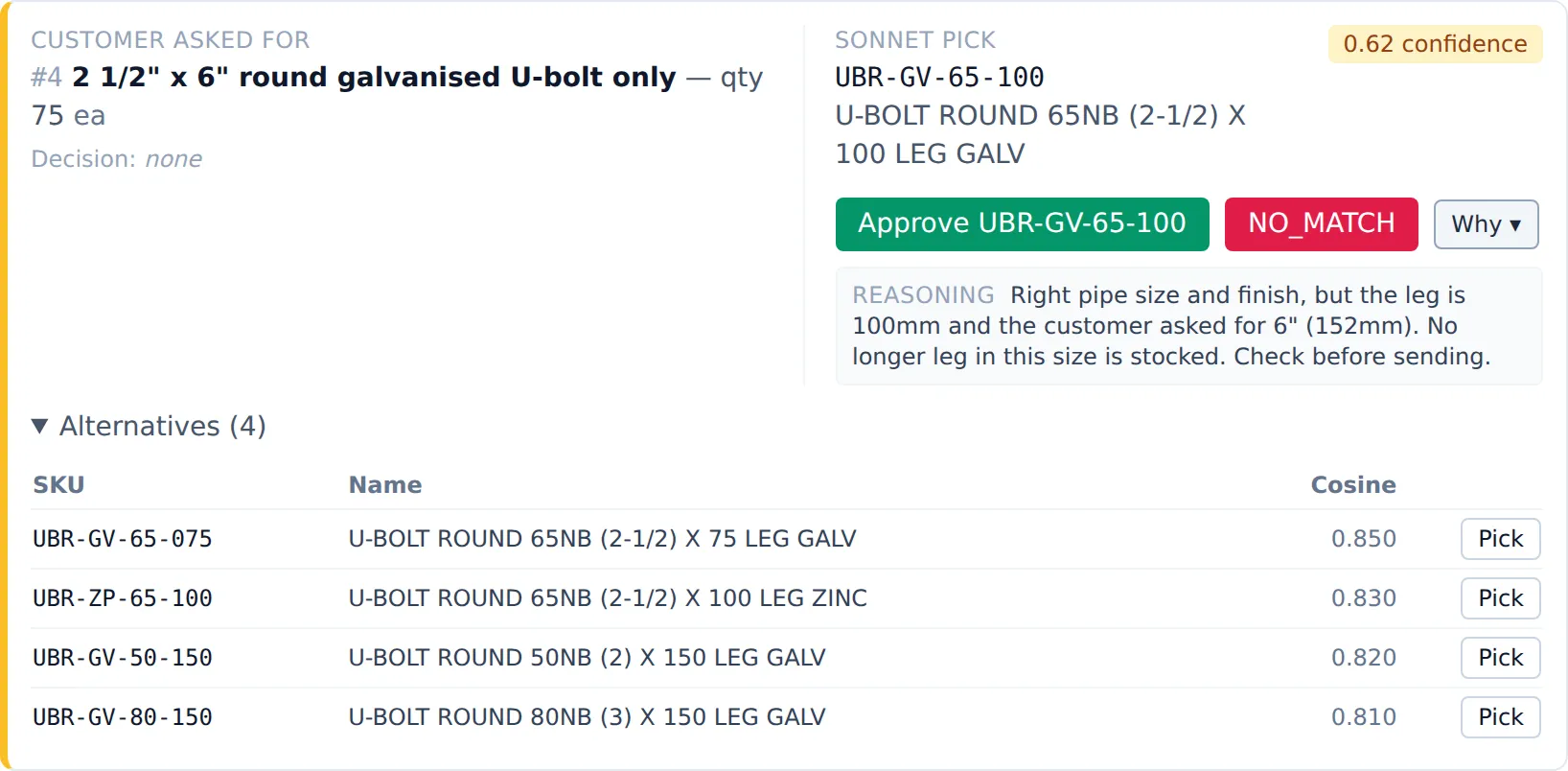
A shaky pick, flagged as one. The leg is shorter than asked for, and the card says so before anyone clicks Approve.
The pitch to the business was one sentence: your people still approve every line; the AI just removes the typing.
It also changes what “good enough” means. A system that has to be right every time is never finished. A system where a person checks every line is useful at 60%, and more useful every week after that.
The first version was bad
Reading the order out of the email turned out to be the easy half. Claude reads the email body and the PDFs directly, no OCR step, and returns a structured order: who it’s from, whether it’s a quote request or a firm order, each line with its quantity. On 14 real emails it got 14 out of 14.
Matching the lines was the hard half.
The obvious approach is embeddings. Turn every catalogue item into a vector, turn the customer’s line into a vector, take the closest. I tested that against 36 real lines the business’s MD graded by hand. Five of them asked for things that weren’t in the catalogue export at all, so the fair score is out of 31.
It got 11. That’s 35%.
Teaching the catalogue the trade
Part of the problem was the catalogue itself. An item list exported from an accounts system is written for the accounts system: short, clipped names in capitals. Customers write “all-thread”, “tek screws”, “gal”, “SS”. The catalogue mostly doesn’t.
So I rebuilt what the search runs over. Claude went through all 18,000 items, one at a time, and wrote each one a proper description: what it is, what the trade calls it, what its grade and finish codes mean. Those descriptions were embedded, and that became the index the search runs over. It’s the retrieval half of a RAG setup, built for one catalogue.
It was the biggest single bill of the build: about $190 in API credits, spent once. Matching a line costs about 5 cents after that.
And first place got worse. It went from 35% to 32%. With richer descriptions, similar items read more alike, so they bunched closer together and the nearest one was wrong more often.
But the right answer was now somewhere in the top 50 almost every time. That turned out to be the number that mattered.
Two stages
What worked was splitting the job in two.
The first stage is that search, but its job changes. It doesn’t have to find the answer. It has to get the answer onto a shortlist of 50. That’s fast and costs almost nothing per line.
The second stage hands those 50 candidates to Claude, along with the customer’s line and the trade rules the business taught me: the stainless grade codes, which finish is the default, when a length has some give. It picks one, or it picks none.
That got 27 of 31. 87%.
Scoring each stage on its own job is what stopped me “fixing” the wrong one. Judged on first place alone, the new index looked like $190 wasted. Judged on the job it actually does, it’s what made 87% possible.
”I don’t know” is an answer
Early versions of the second stage always picked something. Give it a line for a square U-bolt and a shortlist of round ones, and it would hand back the nearest round one with a confident score.
So I made “no match” a valid answer, and scored it as a win when it was the right call. On the lines where the answer wasn’t in the catalogue, it declined five times out of five, and said why: every U-bolt in the shortlist is round-bar; there’s no square one.
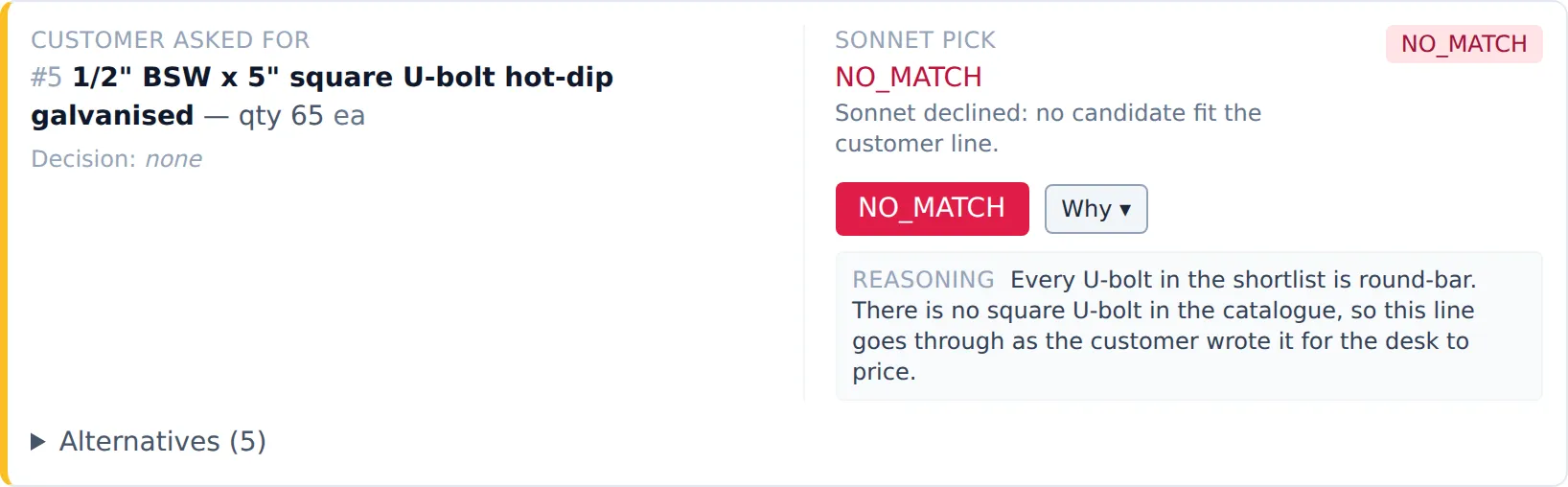
“No match”, with its reason. The line goes through as the customer wrote it, for the desk to price.
That changed the character of the whole thing. A reviewer who sees “no match” knows the system isn’t bluffing, so they trust its picks more, not less.
And the refusals were pointing at something real. Some of the items it couldn’t find, like square U-bolts and wheel nuts, weren’t missing from the shop. They were missing from the catalogue export I’d been handed. The business sent over the gaps: 139 items. Sixteen lines that had been sitting as “no match” now find an item, 13 of them correctly on a first look.
A system that guesses would have hidden that. One that refuses found it.
The idea that died on day one
My first plan had a shortcut. Plenty of purchase orders list a part code next to each line. Match the code exactly and skip the AI for those lines.
Before building it, I checked. Of 24 part codes pulled from real POs, none matched the catalogue. They were the customers’ own internal codes, not the wholesaler’s. The shortcut would have been a day’s work to build something that never fires.
Three minutes and two dollars
What keeps all of this honest is a small test harness: the same 36 graded lines, run through the whole pipeline and scored automatically. Three minutes, about $2 in API calls.
Every change to the matcher goes through it. Wins stay, regressions get reverted. It has already caught one: a prompt change after which the model started building part codes from the naming pattern in its own instructions. Codes that looked right, and weren’t on the shortlist. Eyeballing a few examples wouldn’t have seen it. The harness did.
Thirty-six lines is not a lot. It doesn’t need to be. It needs to exist before you start tuning.
Where it is
- Orders come in by email, get read, matched and queued for review.
- Approving an order puts a real draft into MYOB. The first two went through on Friday.
- The whole run, from reading the email to matching every line, costs about 10 cents an order.
- 87% is on 31 graded lines. That’s a small number and I’m treating it as one. More graded lines are on their way back from the desk.
If you’re building something like this: build the test before you tune anything, let the system say no, and keep a person on the approve button until the numbers say otherwise.